

- Balances that fall below a dollar amount you choose
- Deposits or withdrawals that exceed a specified dollar amount
- Overdrafts and overdraft protection transfers (checking only)
- Availability of new statements and other online documents
Set up account notifications to stay on top of the activity that matters to you. Security alerts are turned on automatically.
You can set up account notifications after enrolling in mobile or online banking. Use the recommended alerts or customize to fit your needs.
Whether you bank in the mobile app or online, you can sign up for real-time notifications of account activity. Receive them by text1, email or push notification (when available).
Choose from a wide variety of notifications. Here are some popular ones by account type:
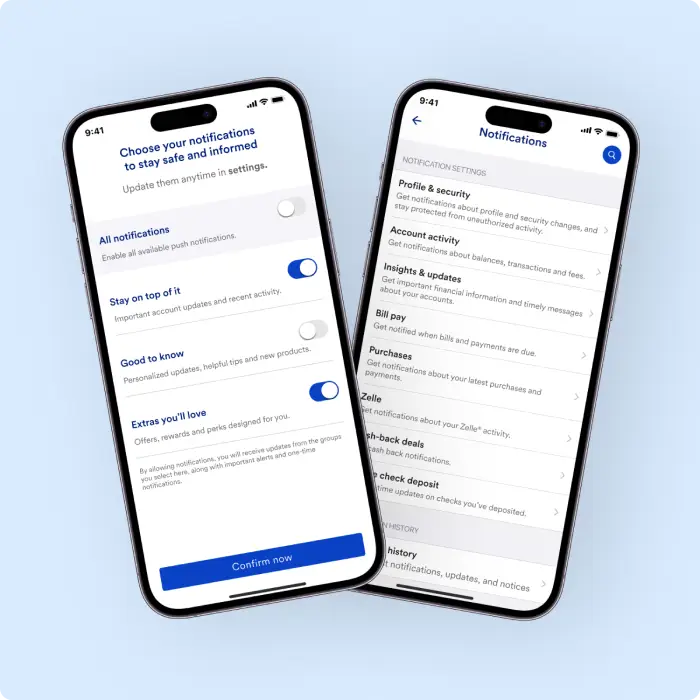
Your information is protected by industry-leading encryption and zero fraud liability.2 Security alerts are sent automatically to your primary email address – no need to sign up. You also have the option to receive them via text message or push notification.
We’ll send you banking alerts if:
You can choose a combination of up to three email addresses or phone numbers. Some notifications require an email address.
Once you’ve set up notifications, you’ll receive them as relevant throughout the day. Always-on security alerts, such as a suspicious transaction or change in password, are sent as quickly as possible.
Yes, you can get notified about any account activity. Turn notifications on or off at any time from your account in the U.S. Bank Mobile App or online banking.
U.S. Bank Mobile App:
Online Banking:
Updated contact info will show up right away as an option for all alert settings.
Check the following:
If you continue to have problems, call 800-USBANKS (872-2657). We accept relay calls.
If you lose your device, you can access online banking with a different device to protect your account. You can either turn off notifications temporarily or choose a new way to receive them. Be sure to repeat the following process for each of your accounts.
U.S. Bank Mobile App:
Note: If you don’t see any alternates, you can update your contact info:
Online Banking:
Note: If you don’t see alternates, you can update your contact info:
Turning on account notifications gives you real-time insight into account activity so that you can spot unusual activity the moment it occurs and take action before larger problems arise.
Have questions or need assistance? Call 800-USBANKS (872-2657) We accept relay calls.
